From create-expo-app to App Store: What's Still Missing
Running npx create-expo-app takes about thirty seconds. What you get back is a working app: two screens, tab navigation, dark mode, and typed routes. It builds, it runs on your phone, and it looks like a real product.
It is not one. A fresh Expo project contains no way to sign a user in, no way to charge them, and no way to reach them again after they close the app.
The gap matters more than it sounds. Apple's 2025 transparency report records 9,100,620 app submissions reviewed and 2,093,244 rejected — just under one in four (Apple App Store Transparency Report). Apple publishes those as totals rather than a breakdown by cause, so treat the number as a measure of how unforgiving submission is, not as proof of what fails. My own reading, after the audit below, is that most of what stands between a fresh project and a shippable one is systems and paperwork rather than product quality.
This is an audit of exactly what a September 2026 Expo project gives you, what it leaves out, and what filling each gap actually involves.
Key Takeaways
- A default Expo SDK 57 project ships 23 production dependencies, two demo screens, and zero authentication, payment, or push code — verified by scaffolding one and grepping it.
app.jsonhas no iOSbundleIdentifierand no Androidpackage, and there is noeas.json. A fresh project cannot be built for either store until you add all three.- Apple's 2025 transparency report records 9,100,620 submissions reviewed and 2,093,244 rejected — just under one in four (23.0%).
- Expo ships three SDK releases a year with a support lifetime of about one year, so upgrade work is a recurring cost, not a one-off.
- The template now ships
AGENTS.mdandCLAUDE.md, so "works with AI editors" is no longer a starter-kit differentiator.
What a fresh Expo project actually contains
To answer this precisely rather than from memory, I scaffolded one on 14 September 2026:
npx create-expo-app@latest probe-app --template default --no-install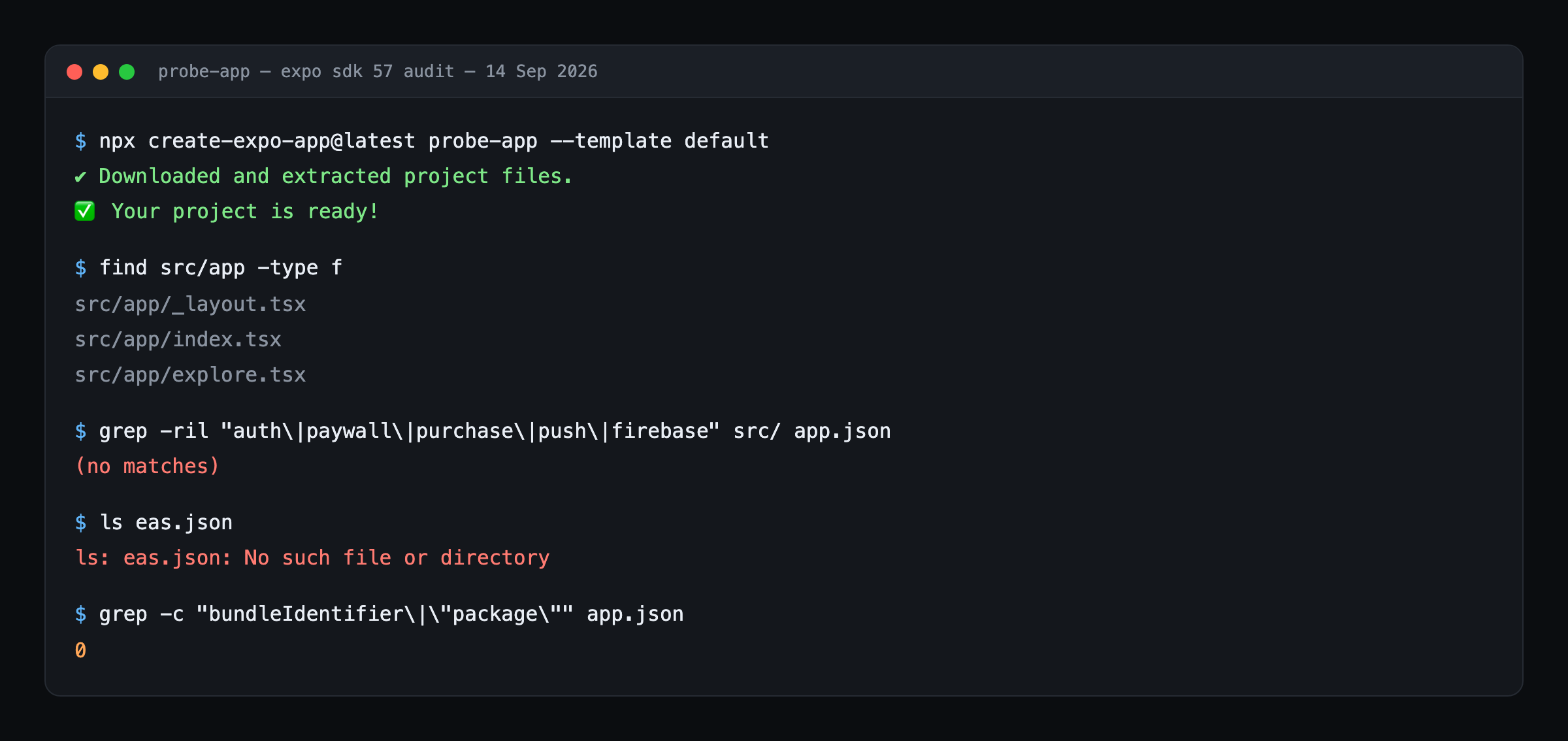
My finding: every figure in this section comes from that one command. Run it against SDK 57 and you will get the same result — this is the default template as Expo shipped it, not a stripped-down variant. (
create-expo-app@latesttracks the newest SDK, so the numbers will move when SDK 58 lands.)
The default template pins these versions:
| Package | Version |
|---|---|
expo | ~57.0.22 |
expo-router | ~57.0.21 (now tracks the SDK major) |
react-native | 0.86.3 |
react | 19.2.3 |
typescript | ~6.0.3 |
That matches Expo's current release: SDK 57 shipped on 30 June 2026 and targets React Native 0.86 (Expo changelog).
The project itself is 23 production dependencies and three route files — src/app/_layout.tsx, src/app/index.tsx, and src/app/explore.tsx. That is two screens and one layout; the root _layout.tsx is itself the tab navigator, which is where the tab bar comes from.
Grepping the whole src/ tree, app.json, and package.json for what a paid app needs returns nothing:
| Capability | Occurrences in a fresh project |
|---|---|
Authentication (auth, login, signIn) | 0 |
Payments (purchase, paywall, subscription) | 0 |
Push (notification, push) | 0 |
Backend SDKs (firebase and equivalents) | 0 |
iOS bundleIdentifier | 0 |
Android package | 0 |
eas.json | file absent |
create-expo-app@latest (Expo SDK 57), 14 September 2026. Reproducible with the command above.The two screens you get are a tutorial, not a foundation. They render dev-menu hints and an animated Expo logo. Expo knows this: package.json includes a reset-project script whose own header comment describes its job as deleting the demo directories and creating "a new /src/app directory with an index.tsx and _layout.tsx file."
So the honest starting line is not two screens. It is two nearly empty files.
The six systems a paid app still needs
Every app that charges money converges on the same six systems. The template covers part of one.
1. Authentication
You need account creation, session persistence across cold starts, protected routes, token refresh, and account deletion. That last item is not optional: Apple's guideline 5.1.1(v) requires that any app supporting account creation also offer account deletion from inside the app (App Review Guidelines).
There is a second trap. Guideline 4.8 says that if you use a third-party login service such as Google or Facebook for your primary account, you must also offer an equivalent option that limits data collection to name and email and lets users keep their email private. Adding "Sign in with Google" alone can fail review.
The real cost here is not the sign-in button. It is deciding where the session lives, making route guards work with Expo Router's file-based layouts, and handling the state where a token exists but has expired.
2. Payments and a paywall
This is the system that takes longest and the one most templates skip. Native purchase APIs differ between platforms, receipts must be validated server-side, and subscription state has to survive reinstalls and device changes. Restore purchases needs to work before review, not after.
The commercial rules keep moving too. Apple's Small Business Program charges 15% for developers making up to $1M in proceeds in the prior calendar year, with the standard rate above that (Apple Developer); regional rates now vary, so check your storefront rather than assuming a single global number. Google restructured its fees for the US, UK, and EEA from 30 June 2026: auto-renewing subscriptions sit at 10% plus a 5% billing fee, with other rates depending on install type (Google Play Console Help).
If your product could bill outside the app stores instead, the economics change completely, and the comparison worth running is against merchant-of-record platforms rather than against store commissions — our payment platform fee comparison works through that on a $5,000-a-month subscription.
Rather than write StoreKit and Google Play Billing integrations twice, many teams put a subscription layer such as RevenueCat in front of both.
It is worth knowing what the payoff distribution looks like before you spend a week here. Measuring newly launched apps across a dataset of more than 115,000, RevenueCat reports that 17.3% hit $1,000 a month and 4.6% hit $10,000 a month in their first two years (State of Subscription Apps). Getting the paywall working is necessary; it is not what makes the app succeed.
3. Push notifications
Push needs a provider, credentials uploaded for both platforms, a permission prompt timed so users do not reflexively decline, token registration tied to user identity, and deep links that open the right screen from a cold start.
Timing that prompt matters more than it used to. Airship reports that with Android 13 and later requiring explicit consent, the historic gap between Android and iOS opt-in rates "has permanently closed," ending what it calls the era of the passive default opt-in (Airship 2026 push benchmarks). You now have to earn the permission on both platforms.
4. Data and backend
Even a simple app needs somewhere to store user data, security rules that stop one user reading another's records, typed client access, and a story for offline and sync.
The security rules are the part that gets underestimated. A default-open database is the most common way a small app leaks data, and rules are hard to retrofit once several screens already read and write collections directly. Decide early whether the client talks to the database or to your own server functions, because reversing that decision later touches every screen.
5. Builds and store configuration
Here the fresh project is blocking rather than merely empty. There is no eas.json, no iOS bundleIdentifier, and no Android package. You cannot produce a store build until those exist, alongside signing credentials, icons at every required size, and a splash screen.
6. Store compliance
Mostly paperwork, but it is the paperwork that fails submissions: a privacy policy URL, accurate data-collection disclosures, age rating, and screenshots at the sizes each store demands.
The disclosures are not a formality. You are declaring what every SDK in your app collects, which means auditing your analytics, crash reporting, and attribution libraries rather than guessing. Adding one SDK late in the project can invalidate a disclosure you already submitted.
Apple's privacy manifest adds a wrinkle specific to React Native. Expo can generate PrivacyInfo.xcprivacy from your app.json, but its own documentation warns that you must add reasons for third-party libraries manually, because Apple "does not correctly parse all the PrivacyInfo files included by static CocoaPods dependencies" (Expo privacy manifests guide).
The deadlines that are already on the calendar
Shipping is not a single event you schedule once. Both stores move their floor every year, and 2026 has been busier than most.
Two of these are hard gates. Since 28 April 2026, builds uploaded to App Store Connect must be made with Xcode 26 or later (Expo blog). Since 31 August 2026, new Google Play apps and updates must target Android 16, API level 36, with extensions available to 1 November 2026 (Play Console Help).
Underneath that sits Expo's own cadence. New SDK versions ship three times a year — SDK 56 and 57 happened to land unusually close together — and Expo's guidance puts the supported lifetime of any given SDK at approximately one year (expo/fyi). Whatever you build, you are signing up for an upgrade roughly annually.
What the gap costs
I could not find a credible published survey on how long auth, payments, and push take to build; everything I turned up was agency marketing with unsourced ranges. So here is a defensible way to size it yourself instead.
The US Bureau of Labor Statistics puts the median annual wage for software developers at $135,980 as of May 2025 (BLS Occupational Outlook Handbook). At 2,080 hours a year that is about $65 an hour, so a week of setup work costs roughly $2,600 and two weeks roughly $5,200. Those dollar figures are arithmetic on the BLS median, not a published statistic — substitute your own rate. They also understate true cost, since a salary-derived hourly rate excludes employer overhead.
For comparison, here is our own published estimate of time-to-first-feature. These are our figures, not independent research, and should be read that way:
| Starting point | Time before your first real feature | Basis |
|---|---|---|
| Build from scratch | 1–2 weeks | CodeBaseHub estimate, not independent research |
| Generic boilerplate | 2–4 days | CodeBaseHub estimate, not independent research |
| A kit with payments already wired | Same day | CodeBaseHub estimate, not independent research |
What matters is not the headline number but which system the days go into. Auth and push are well-documented and mostly mechanical. Payments deserves the most time, because a subscription bug stays invisible until it has already cost you revenue.
Where a starter kit stops being worth it
A kit is a bet that your app resembles the kit's assumptions. When it does not, you pay twice — once for the code you inherit and again for the code you rip out.
Skip the kit when:
- You are learning React Native. Inheriting six configured systems teaches you none of them. Build them badly, once, on purpose.
- Your app does not charge money. The most expensive system to build is the one you would delete.
- You need custom native modules. If your product depends on Bluetooth, background audio, or a vendor SDK, the managed-workflow assumptions in most kits work against you.
- The kit is not maintained. With three SDK releases a year and a one-year support window, an unmaintained kit is a migration you inherited rather than a head start.
That last one deserves the most weight. Check the commit history before the feature list.
One 2026 change is worth noting for anyone comparing kits: the default Expo template now ships AGENTS.md, CLAUDE.md, and a .claude/settings.json. "Works with AI editors" used to be a genuine differentiator. It is now the baseline, so judge kits on what they add beyond it.
If you would rather start from a wired app
If you have read this far and concluded the six systems are a tax rather than the product, that is the case for starting from a kit instead of a template.
The CodeBaseHub React Native starter kit ships those systems already wired on Expo: Firebase auth with email, Google, and Apple sign-in; RevenueCat subscriptions with a paywall; OneSignal push; Firestore with typed hooks; and EAS build profiles for both stores. It is a one-time purchase, and you own the source.
If you would rather compare options first, the starter kit comparison lays out the criteria that actually matter.
Frequently asked questions
Does create-expo-app include authentication?
No. A fresh Expo SDK 57 project contains no authentication code — grepping the generated src/ directory for auth, login, or signIn returns zero matches. You add it yourself, either directly against a provider SDK or through a starter kit that has already wired one.
Can I build a fresh Expo project for the App Store right away?
No. The generated app.json has no iOS bundleIdentifier and no Android package, and the project contains no eas.json. All three are required before you can produce a store build.
How often does Expo release a new SDK?
Three times a year. Expo's documentation states that new SDK versions are released three times each year, and the supported lifetime of any given version is approximately one year, tracking the iOS and Android release cadence.
Do I still need a starter kit now that Expo ships AGENTS.md?
The AI-context files close only the "your editor understands the codebase" gap. They do not write your paywall. A kit is still worth considering for the wired systems — auth, payments, push, and store config — and is worth less if those files were the only reason you wanted one.
What is the hardest of the six systems to build?
Payments. Auth and push are well-documented and largely mechanical. In-app purchases involve two different native billing APIs, server-side receipt validation, restore-purchase flows Apple tests during review, and subscription state that has to survive reinstalls.
The short version
A fresh Expo project in September 2026 is an excellent place to start and a poor place to stop. It gives you navigation, theming, typed routes, and a modern toolchain. It gives you nothing that makes money or brings users back.
Before your first feature you will build six systems: authentication, payments, push, data, builds, and store compliance. Decide deliberately which you want to learn and which you want to inherit — and if you are charging money, start with payments, because it is the one that quietly costs the most.
Related articles
- How to Add RevenueCat Paywalls to an Expo App (Without Rebuilding Billing)A practical Expo guide to RevenueCat paywalls—install react-native-purchases, configure entitlements and offerings, presentPaywallIfNeeded, and go live with API keys plus a feature flag. RevenueCat integrated; key + flag to activate, not out-of-box subscriptions.
- Free React Native Boilerplates and Where They StopIgnite and the Obytes starter give you architecture, testing, and CI. Neither ships auth, payments, or push. Here is exactly where free boilerplates stop, and when that matters.
- 3 Competitor Analysis Sites Every Developer Should KnowBefore you build, check if the idea actually makes money. These three tools show you real revenue, App Store numbers, and why winning apps get downloaded.